Introducing NoteVision
A side project that turns scans, photos, and handwritten notes into interactive web pages. Layout, diagrams, equations, and the small marks in the margin are rebuilt instead of just transcribed.
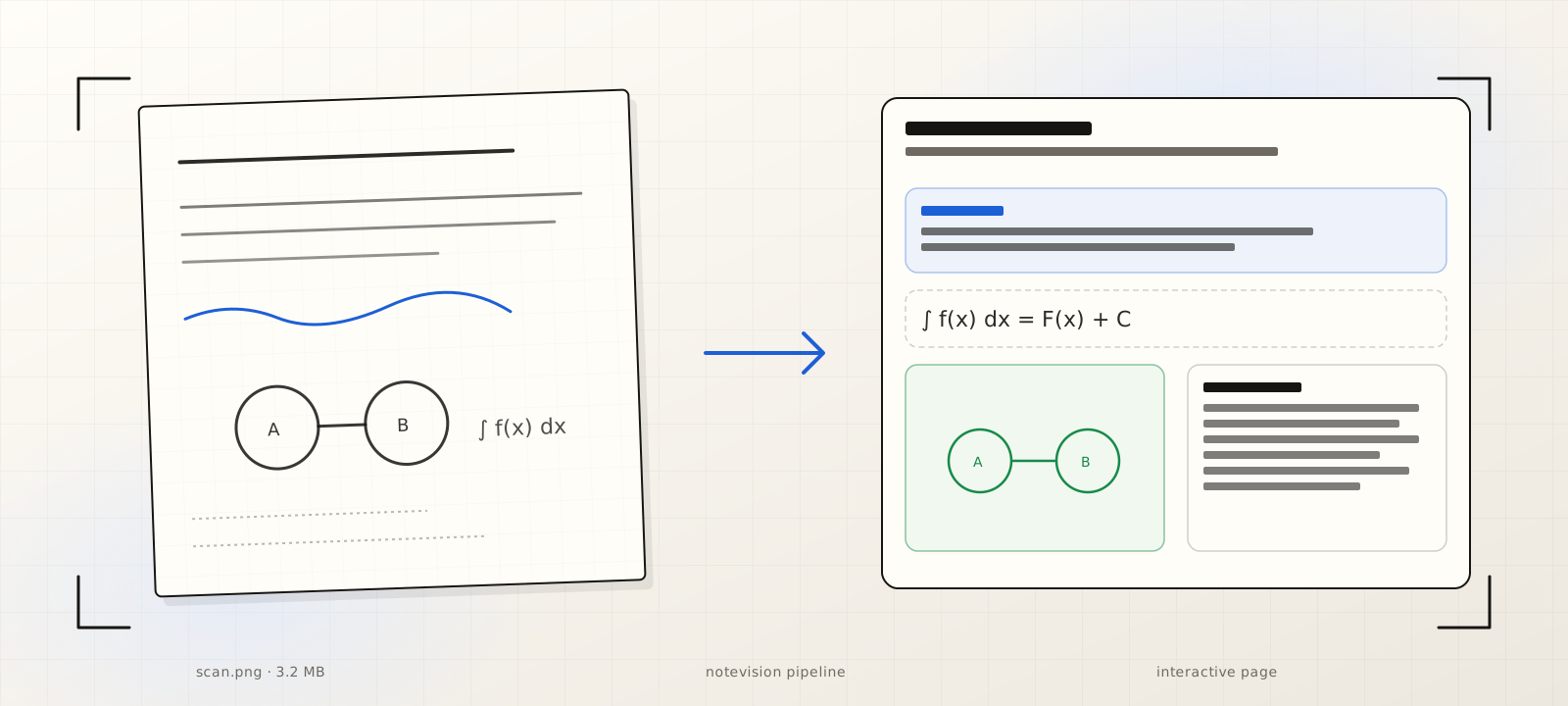
I have been quietly working on a small project for the last couple of weeks. It takes a scan or a phone photo of almost any document and rebuilds it as an interactive web page. I am calling it NoteVision.
The output is not a transcript. It is a page you can actually navigate, with sections, headings, figures, equations, and the loose notes from the margins each sitting in their own place. The thing I started this project to find out was whether modern multimodal models could preserve the structure of a document, not just the characters on it.
Why not just OCR it
OCR has been good enough for clean printed text for a long time. The hard part has never really been pulling characters off a page. The hard part is keeping the shape of the thing: which paragraph belongs to which heading, which figure caption belongs to which figure, which scribble in the margin was meant to point back into the second paragraph on the previous page. If you flatten all of that into a plain text dump, you lose most of what made the document useful in the first place.
NoteVision treats a document the way you would treat a web page. A layout. A hierarchy. A set of regions that mean different things. The output of the model side is not a string, it is a structured representation that a small rendering layer can turn back into something a person can read and click through.
The pipeline
Four pieces, each used where it is genuinely the strongest:
- LandingAI's Document Pre-trained Transformer (DPT-2) does the visual decomposition. It segments regions, identifies tables and figures, and gives me an honest read on reading order. This is the layer where generic vision LLMs still routinely lose the layout.
- Claude handles the dense reasoning passes: long-form notes, derivations, anything where cross-referencing matters more than character-level accuracy.
- Gemini takes the visually noisy work where world knowledge matters more than glyphs. Hand-drawn diagrams, scrappy symbols, the kind of handwriting where context carries more signal than letterform.
- GPT picks up the lightweight normalization passes: cleaning fragments, regularizing terminology, formatting math into LaTeX so KaTeX can render it.
A rendering layer takes the resulting structured document and emits the UI: collapsible sections, KaTeX for equations, figure captions wired to the right paragraphs, and notes anchored where they originally lived.
What surprised me
What surprised me was not the easy cases. It was the inputs I had assumed would be a wall:
- Blurry phone photos shot at an angle with shadow across half the page.
- Faded handwriting where individual letters are unrecognizable but the line still makes sense in context.
- Multi-column lecture notes where the reading order is not visually obvious.
- Hand-drawn diagrams with annotations pointing back into the prose.
The pipeline handles all of these usably, not perfectly. The combination of a document-pretrained model for layout and frontier multimodal models for content recovery is doing real work. The layout model keeps the structure honest. The content models fill in the bits where pure OCR would have given up and emitted a confident guess.
What is still hard
I do not want to oversell it. NoteVision still mis-reads symbols on the worst inputs. Multi-language documents with mixed scripts need more work. Per-page latency is a few seconds, which is fine for upload-and-walk-away but not interactive. I have not started thinking seriously about cost per page yet, and the answer will be load-bearing if I ever want this to be more than a side project.
Where this is going
The point of NoteVision is less about extracting text and more about preserving what a document actually was: a layered, navigable artifact. When a student opens a scan of their lecture notes, what they actually want is not a text file. They want their notes back, just more navigable. Same for an analyst opening a scanned report, or a doctor opening a faxed referral, or anyone opening a photograph of a whiteboard.
Still experimenting. Still tuning. Will share more as it gets sharper.
References
- 01LandingAI expands Agentic Document Intelligence with DPT-2 · landing.ai
- 02Document Pre-trained Transformer 2 (DPT-2) · landing.ai
- 03Agentic Document Extraction overview · landing.ai
- 04Best Handwriting OCR Tools in 2026 (benchmark comparison) · AIMultiple
- 05OmniAI OCR Benchmark · getomni.ai
- 06OCRBench v2: Visual Text Localization and Reasoning · arXiv
- 07KaTeX: web math typesetting · katex.org
Reach out
If something here resonated, I'd love to hear what you're building. Always open to a good conversation.