The web application that does not flinch
A field guide to what a browser tab can genuinely accomplish in 2026: installation, offline operation, on-device perception and inference, and resilience in dead zones. It also offers a candid map of the four domains in which native platforms retain a decisive advantage.
Consider a commuter whose train slides into a tunnel and loses signal. The transit application opens regardless: the pass renders, the QR code scans at the far gate, and at no point did a request reach a server. The interaction completed entirely on the device, and the user perceived no interruption.
Comparable scenarios recur across domains. A courier in a concrete loading dock, with no cellular bars, marks a parcel as delivered and walks away; the record holds, and it uploads an hour later from the street without anyone attending to it. In a basement retail shop, a point-of-sale terminal continues ringing up the lunch rush on a connection that has been absent since the doors opened. In each case the work persists locally and reconciles with the server opportunistically.
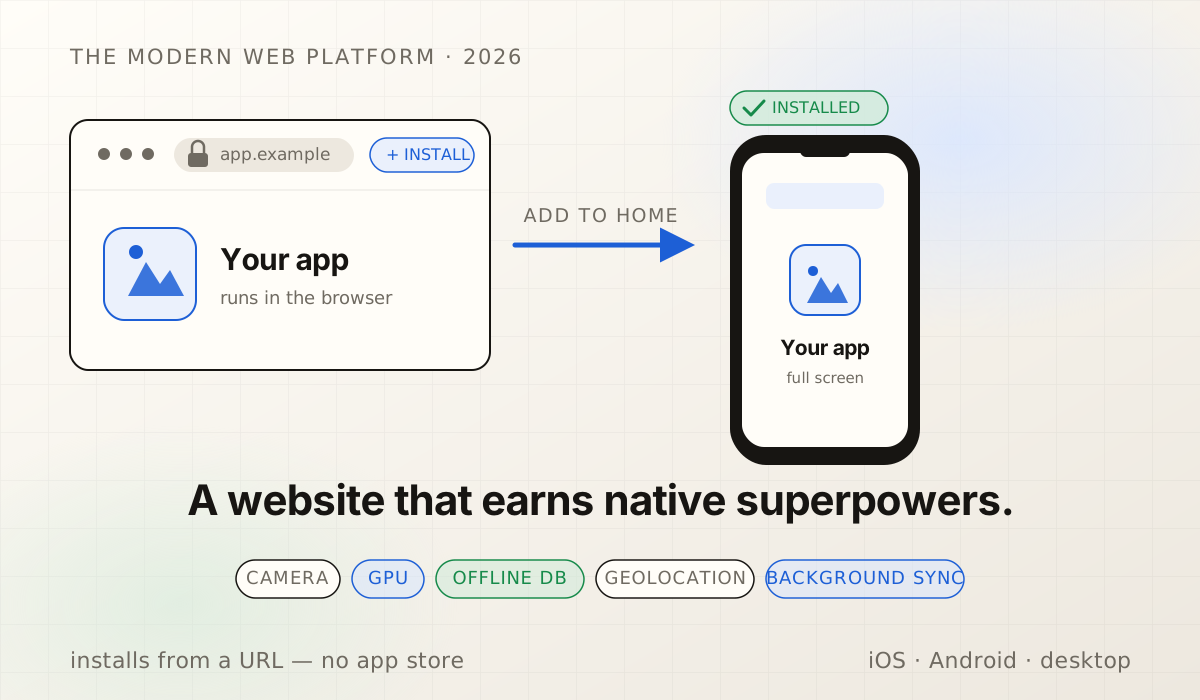
Crucially, every one of these experiences ran inside a browser tab. There was no app store, no large download, and no native binary: a website performing tasks the industry once reserved exclusively for native applications. This remains the proposition many engineers find difficult to accept, principally because the mental model they hold of the web is roughly a decade out of date.
What follows is a structured survey of what the modern web can do in 2026, examined capability by capability, each paired with the engineering cost one would incur to match it natively. The argument is deliberately not promotional. There remain four domains in which native platforms still prevail, and the essay names all four explicitly rather than eliding them.
What a PWA actually is in 2026
A Progressive Web App rests on three components. The first is a web app manifest, a compact JSON document declaring the application's name, icons, and launch behavior. The second is a service worker, a script the browser keeps resident in the background to intercept network requests and mediate caching. The third is HTTPS, since none of the platform's powerful APIs are extended to an insecure origin. Once these three conditions are satisfied, the operating system begins to treat the website as an installed application.
The operative term is progressive, and it denotes a specific architectural discipline. One establishes a baseline that is merely a website and always functions, then layers additional capability above it: camera access, GPU compute, durable storage, background synchronization. Each capability is detected before it is invoked. Where a capability is present, the application does more; where it is absent, the application degrades to something that nonetheless works. The governing principle is to probe rather than assume, and to provide a fallback in every case.
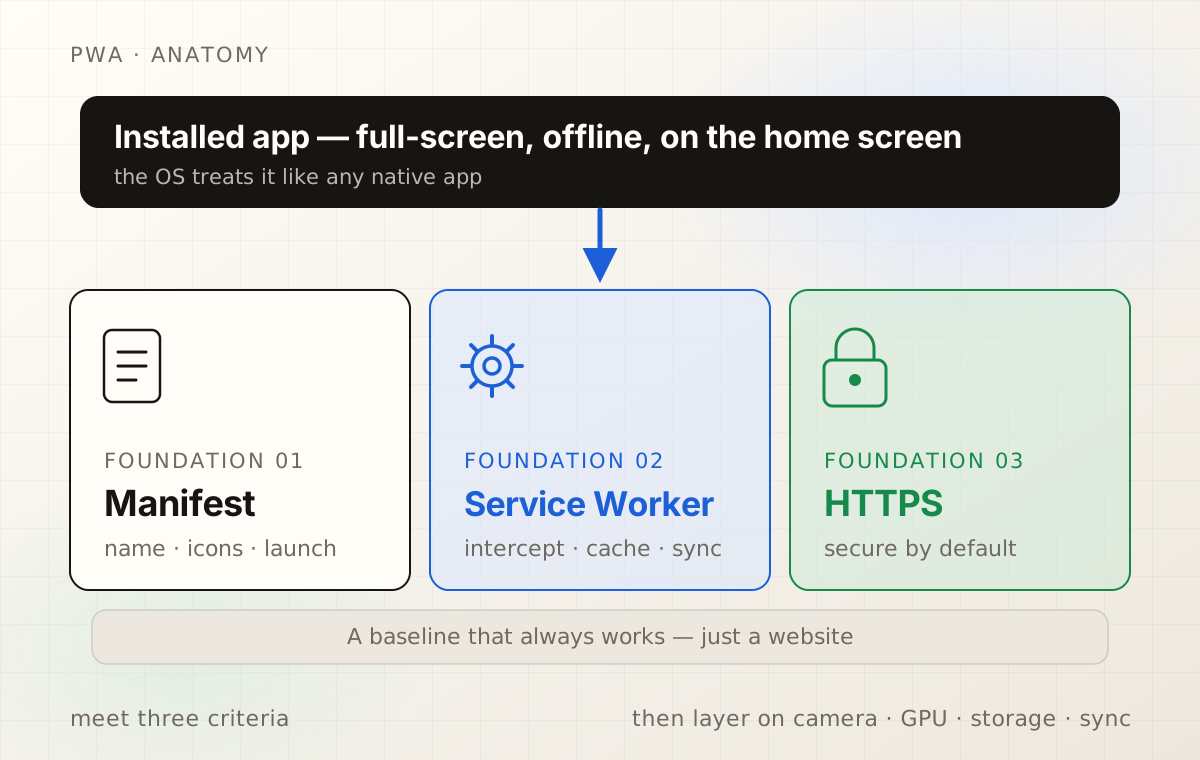
One misconception merits correction at the outset. A PWA is not a diminished, second-class "lite" edition of a real application; it is a real application delivered over a URL. It exposes the same camera, the same offline database, and the same on-device inference. What it forgoes is the icon on a store shelf, and as the analysis below demonstrates, that concession proves considerably smaller than the industry has historically priced it.
The capability tour
Each capability below is examined along three dimensions: what the platform provides, how a serious application employs it in practice, and the native tax, by which we mean the engineering one would undertake to achieve the equivalent result in a Swift or Kotlin codebase rather than a web one.
It installs like an application
On Android and desktop, once a site satisfies the install criteria, the browser offers to add it to the home screen. The application then launches in its own window with no address bar, appears in the app switcher, and behaves like any other resident program. The user never observed a download progress bar; they tapped install, and the application was present.
Executing this well is a matter of careful detail. A maskable icon allows the platform to crop the artwork into whatever shape the launcher employs without truncating the logo. A splash background color declared in the manifest, matched to the first paint, prevents the launch from flashing white. On iOS, an apple-touch-icon supplies the home-screen image, and respecting the safe-area insets keeps the layout from sliding beneath the notch or the home indicator. None of this is technically difficult; collectively, however, it is the difference between an application that feels installed and one that feels merely bookmarked.
A candid caveat applies to iOS, which offers no install prompt. Because there is no beforeinstallprompt event, one cannot trigger "Add to Home Screen" from a button; the user performs the action manually through the share sheet. Consequently the interface must teach the gesture, ideally through a tasteful hint delivered at an opportune moment rather than a banner that competes with the content.
It works with no signal
This is the capability most commonly presumed impossible on the web, and it is precisely the one at which the web now genuinely excels. IndexedDB furnishes a durable on-device database with real records and real indexes that survive reloads and reboots. The pattern that renders an application robust offline is write-before-network: the user's action is committed to IndexedDB first, before any request is attempted, so the work is secured the instant they tap. A synchronization engine subsequently drains that queue whenever connectivity returns.
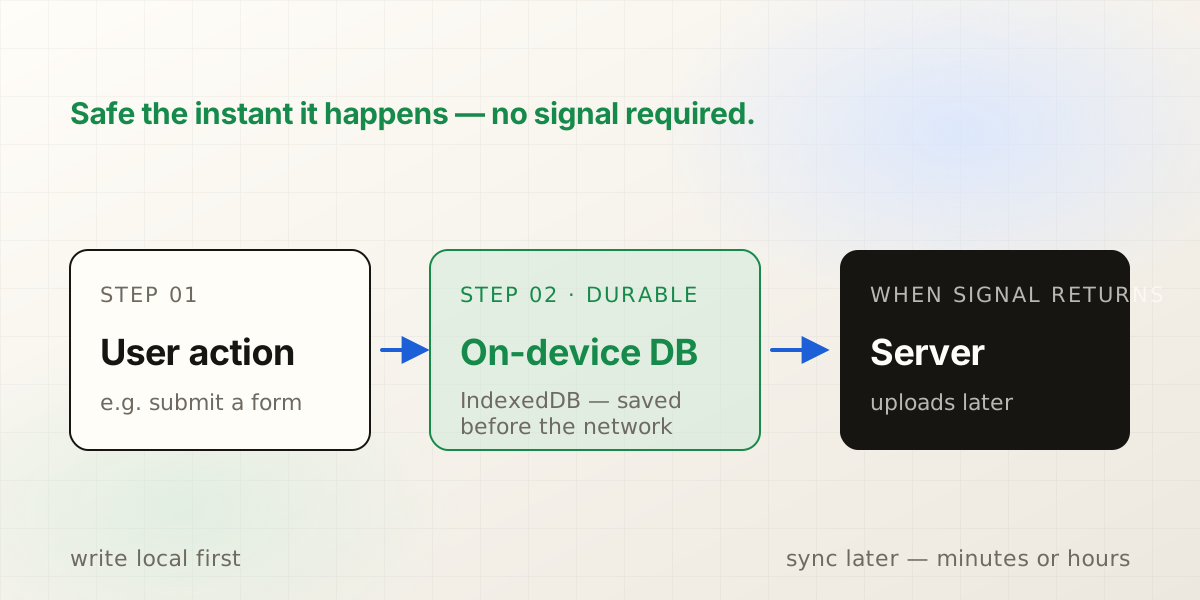
Three measures elevate this pattern from a demonstration into something one would entrust with real work. First, calling navigator.storage.persist() prevents the browser from evicting the data the moment it seeks to reclaim disk. Second, attaching an idempotency key to every queued write allows the server to recognize a duplicate when the network flickers and a request retries, so that it neither double-charges nor double-creates. Third, storing per-user snapshots ensures that a person who opens the application in a dead zone sees their actual data (their route, their form, their cart) rather than a generic offline page. A field-survey form at a remote site, a notes application at altitude, and a ride-hail screen at the edge of coverage all exhibit the same shape.
It sees and thinks on-device
getUserMedia grants a web application access to the camera. OffscreenCanvas, operating within a worker, permits frame processing without freezing the interface. WebAssembly executes compiled numerical code at near-native speed. Combined, these primitives allow a browser tab to run a genuine machine-learning model over a live video feed while the frames never leave the device. That last property carries weight in regulated work long before it appears on any marketing page.
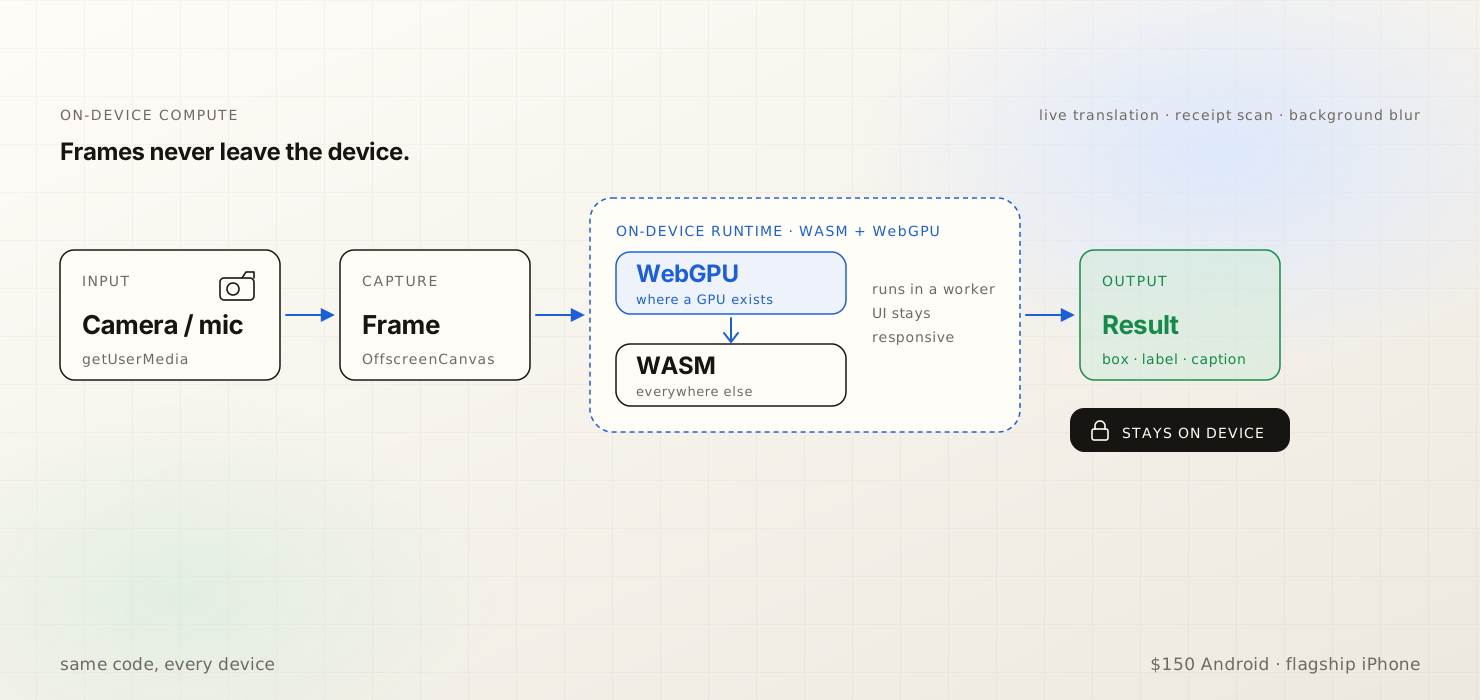
WebGPU is now enabled by default in every major browser. The discipline is to probe for it, run inference on the GPU where it is available, and fall back to a WASM build of the same runtime where it is not, so that one code path serves both a budget Android phone and a flagship iPhone. All of this should remain off the main thread, inside a worker, so that taps stay responsive while a model processes a frame. This is the machinery behind video-call background blur, live caption and translation, receipt and barcode scanning, and a photo editor lifting a subject from its background, each running within the tab and none of it transmitting data.
It survives flaky networks
Outright offline operation is, paradoxically, the simpler case, because the absence of connectivity is at least honest. The more pernicious case is the network that is almost present: the captive portal at the cafe that reports a connection while routing nothing, the elevator, the basement, the train pulling away from the platform. navigator.onLine reports "online" for all of these and thereby misleads.
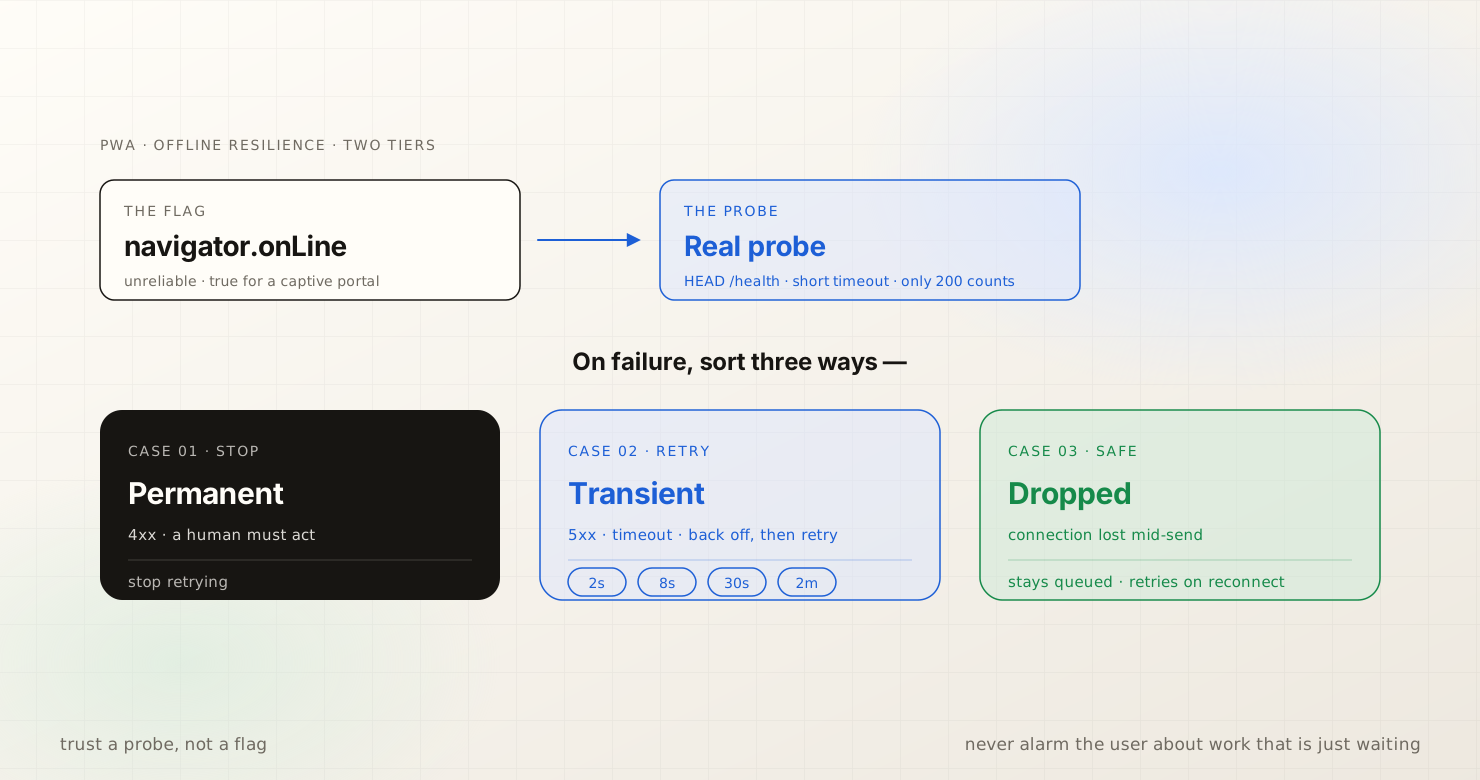
The remedy is to distrust the flag. One confirms reachability with a real probe, a small request to one's own endpoint, before concluding that the application is online. One imposes a bounded timeout on every upload so that a half-open connection cannot stall the queue indefinitely. One classifies failures with care: a permanent rejection halts and surfaces, a transient error backs off and retries, and a dropped connection simply remains queued. One employs the Web Locks API so that two open tabs do not both attempt to drain the same queue and collide. Where the platform permits, the Background Sync API enables the service worker to complete an upload after the user has closed the tab; that capability is Chromium-only, so on iOS one falls back to synchronizing whenever the page is open and foregrounded.
It updates itself, safely
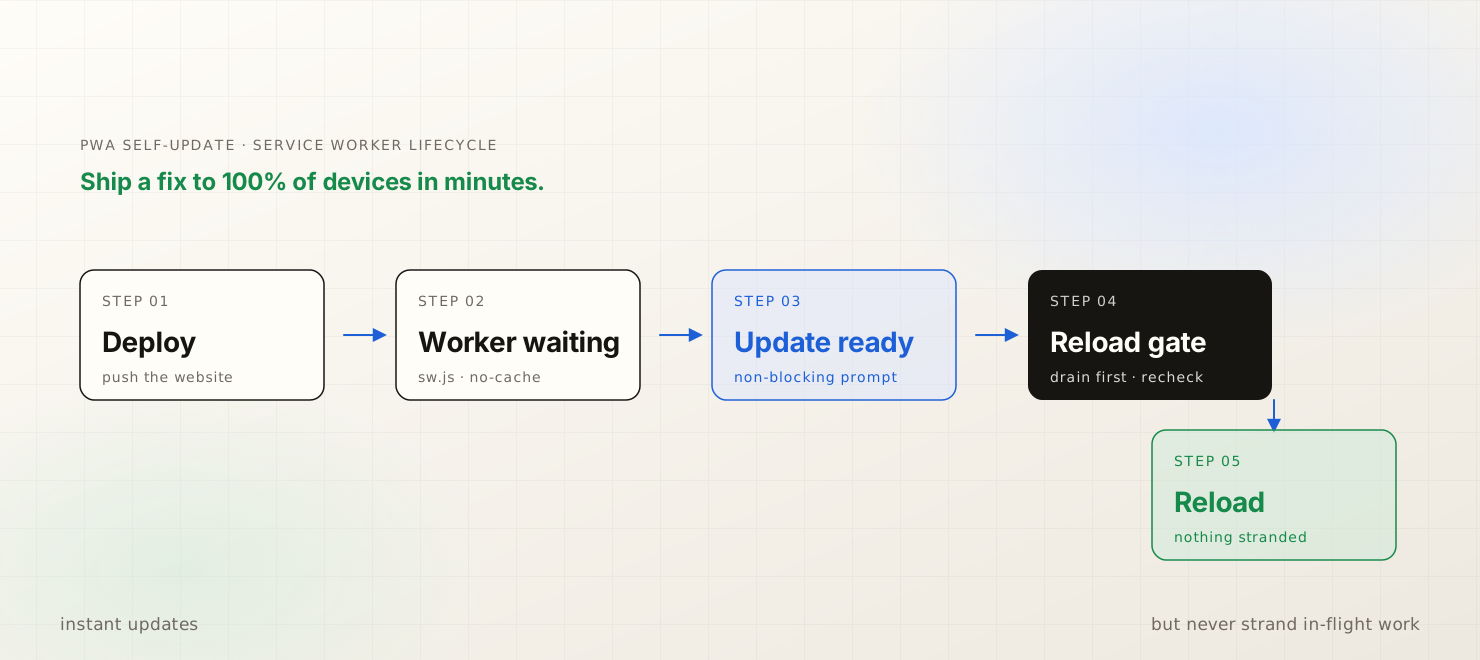
On deployment, a new service worker installs in the background and waits. One must not allow it to assume control silently, because a build swapping underneath a running page can strand work in flight. Instead one gates the reload: a quiet, non-blocking notice announces that a new version is ready, any pending writes are drained first, and only then does the page refresh. A critical fix consequently reaches every device within the minutes it takes to deploy a website.
It guards shared devices
A subtle trap awaits those who first cache aggressively on a device that more than one person uses. Service worker caches are keyed by URL, and a URL key disregards the Authorization header. A response cached for one signed-in user can therefore be served to the next person who requests the same URL. On a clinic check-in kiosk, a shared warehouse tablet, or a library terminal, this constitutes a cross-user data leak rather than a performance optimization.
The corrective has three parts, and all three are required. First, never cache authenticated responses: cache only the static shell and public assets, and route user data to the network. Second, purge on sign-out with a deny-by-default sweep, so that anything which should not survive the session is removed before the next person touches the screen. Third, back the whole arrangement with row-level security on the server, so that even if a stale token somehow passes through, the database refuses to return another user's rows. The maxim is to cache for speed and never for secrets.
“Most engineers who dismiss PWAs are arguing with a version of the web that ceased to exist years ago. The support matrix caught up while they were not looking.”
PWA versus native, compared directly
The comparison is best conducted along the three axes that actually decide a project. Distribution contrasts a single URL with two store listings and two review queues. Economics concerns who takes a share of revenue, and how large that share is. The capability ceiling measures how much of a real application each approach can in fact deliver. As the preceding tour establishes, the capability gap is now narrow; the decision therefore tends to be settled on the other two axes.
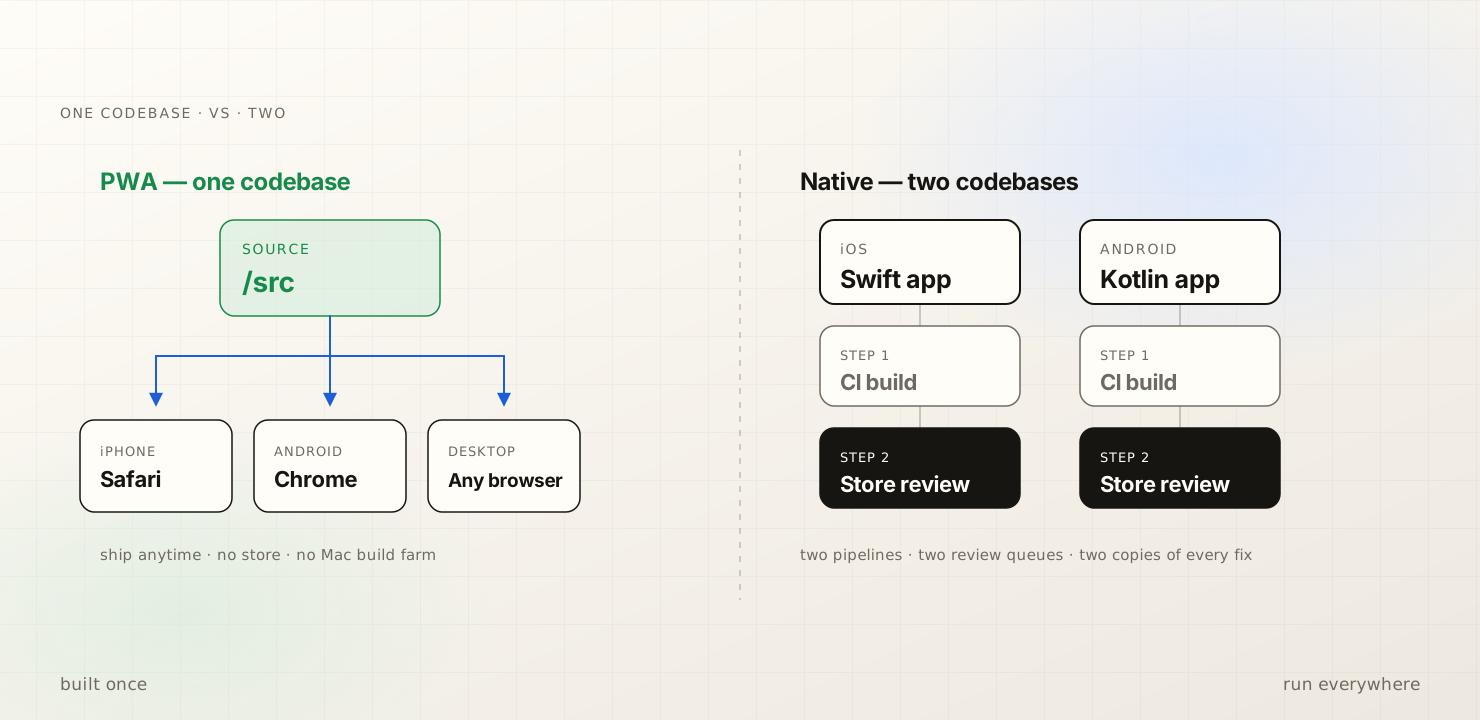
On economics, the figures are instructive. Apple takes up to 30 percent, or 15 percent for small businesses enrolled in its program; Google has been reducing its rates; and web payments run through a processor at roughly 3 percent. There is also a cost that appears on no invoice: the risk that a review rejects a release on a Friday for a reason one will spend Monday decoding. The public case studies are now dated yet remain directional. Twitter Lite shipped as a roughly 600KB PWA against a 23.5MB native application. Starbucks built a 233KB ordering PWA alongside a 148MB iOS application and observed web orders climb. Tinder reduced its initial load from 30MB to 2.8MB and cut load time by approximately 61 percent. Pinterest rebuilt its mobile web and watched signups and engagement rise. These figures date from 2017 through 2019 and none is precise today; nonetheless, the underlying shape has grown only more favorable since.
The honest limits
Four domains remain in which native platforms still prevail, and pretending otherwise serves no one. Background work on iOS is heavily restricted: a closed PWA does not get to run, so anything that must happen while the application is shut waits until it is reopened. Push notifications on iOS now function but are less reliable than their native counterparts, so one should not construct a workflow that depends on a push arriving. Hardware radios are uneven, because Web Bluetooth, Web NFC, WebUSB, and Web Serial are Chromium-only and absent on iOS, rendering a hardware-handshake flow non-portable. Storage eviction on iOS is more aggressive as well, which is precisely why persistent storage and a server-side source of truth are not optional.
The remedy for all four is identical in form. One neither denies the limit nor papers over it. Instead, one architects so that the constrained capability sits off the critical path, never allowing the core task to depend on background execution, a guaranteed push, an exotic radio, or local storage outside one's control, and then degrades gracefully when the capability is missing. A limit one has designed around becomes a footnote; a limit one has ignored becomes a support ticket.
Why build on the web now
The case accumulates. One codebase replaces two. Distribution proceeds by URL rather than by review queue. Camera access, durable offline storage, on-device inference, self-updates, and shared-device security all operate within a tab, on every device, with no native binary to sign. Two years ago such a claim could not have been advanced credibly. What changed was the slope rather than any single feature landing: the platform converged steadily until the capabilities that once mandated a native application quietly became defaults.
The limits are real, and they are narrow. For field tools, internal applications, commerce, content, and productivity software, which together constitute most software, the web is the option that costs less to build and less to operate. The engineering effort is consequently spent on the product itself rather than on shipping the same product twice.
How to get started
No rewrite is required. One needs a baseline that works and then layers capability upon it. Five concrete steps, taken in order, suffice:
- 01Ship a manifest. Declare the name, a theme color, a splash background matched to the first paint, and a maskable icon together with an apple-touch-icon for iOS. This alone renders the application installable on Android and desktop.
- 02Register a service worker. Prefer Serwist or Workbox over hand-written caching logic, precache the application shell, and serve a clean /offline fallback page so that a cold load with no network presents a designed screen rather than a browser error.
- 03Build a durable outbox in IndexedDB. Write before the network, attach an idempotency key to every queued action, and coordinate draining across tabs with the Web Locks API so that two tabs never contend over the same queue.
- 04Detect capabilities and never assume them. Probe for WebGPU before using it, optional-chain the APIs that may be absent, and confirm connectivity with a real reachability probe rather than trusting navigator.onLine.
- 05Meet the install criteria, call navigator.storage.persist() to request durable storage, and deploy. Thereafter observe real devices, because the field is where assumptions break.
Beyond that, the remainder is simply engineering, the same engineering as native, except that one performs it once.
References
- 01What makes a PWA installable · web.dev
- 02Learn PWA · web.dev
- 03Web platform capability status (Project Fugu) · Chrome for Developers
- 04WebGPU API · MDN Web Docs
- 05Background Synchronization API · MDN Web Docs
- 06Web Locks API · MDN Web Docs
- 07StorageManager: persist() · MDN Web Docs
- 08PWAs on iOS and iPadOS · firt.dev
- 09App Store Small Business Program · Apple Developer
- 10PWA case studies and statistics · pwastats.com
Reach out
If something here resonated, I'd love to hear what you're building. Always open to a good conversation.